Creating a Rust VBS Enclave DLL running in VTL1
Running Rust in VTL1
Intro
In case you were wondering - YES you can write code for Windows VBS Secure enclaves in Rust, I will show you how and talk you through the process! You can find this project on GitHub.
Recently I wanted to run some Rust code inside a Secure Enclave (VTL1). Microsoft has an official example of doing so in C++.
Well, this was a frustrating challenge at first.. there was no real guidance on doing so specifically as a Rust project, so I just straight up followed the MSDN docs for getting setup and a simple application built.
I then stumbled across vbs-enclave-rs which is a POC for developing a secure enclave
DLL in Rust - the loader is in C++ and the enclave app is Rust. In the end, this did not help solve the problem I was having. Nevertheless
I took their build.rs file for the VBS application in the event that was the problem, and I do think that has made a nice addition
to my project.
We will build an application where the secure VTL1 DLL has a secret password in memory, and the normal application will pass passwords to it. The normal application has no idea what is in the secure memory, so we can only find whether we had a valid password or not after calling the secure function!
VBS primer
VBS, or Virtualisation Based Security, uses the hypervisor (Hyper-V) to create isolated environments for which access to their memory is prohibited between boundaries. This is the backbone of the modern Windows Hypervisor, for example, protecting each guest’s memory from sibling guests. The hypervisor is able to set these protections via Second Level Address Translation (SLAT), which is what enforces the boundary. I won’t pretend I can cover the internals from memory without referencing sources - instead I would highly recommend reading Connor McGarr’s blog post introducing HVCI and VBS.
More importantly, VBS has been a bit of a game changer when it comes to Windows security features such as Credential Guard. While
historically, credentials were stored in lsass.exe, which was protected using Protected Process Light (PPL), VBS now allows for
the creation of a secure
‘trustlet’ (a program in VTL1) in which the credentials are stored. No process outside of the trust boundary of VTL1 can access the
memory within the enclave. The secure kernel can access the memory, but this is a proprietary system written by Microsoft, which also
runs in VTL1, and brokers memory commitment into it.
In modern Credential Guard deployments, credentials which were stored in lsass.exe are now stored in lsaiso.exe - and lsass acts
as a broker between inputs from the operating system, network and user and to the isolated user-mode application (lsaiso) aka Credential Guard.
This effectively
defeated the classic mimikatz and mimidrv attack techniques of stealing secrets from memory. Neat!
To be clear however - VBS enclaves are not the same isolation primitive used by Credential Guard (lsaiso).
Secure enclaves
Secure enclaves act as an extension of a usermode process which is running in VTL0 (the least privileged layer). These extensions are DLLs which are loaded into the process through a series of function calls. In order for them to be loaded, hyper calls are issued to the secure kernel which allocates memory and maps the DLLs into the process. Once complete, the VTL0 application is able to call exports of the DLL through the CallEnclave function.
The advantage of using VTL1 isolation (whether through trustlets like lsaiso or VBS enclaves) is we are able to store secrets within an enclave that no other process is able to access. VTL1 memory is protected from arbitrary kernel memory reads, but not from the secure kernel or hypervisor-level actors.
One key note is DLLs which are loaded into secure enclaves must be signed by a valid certificate. For local testing and exploring, we can use a development certificate to achieve this enabling test signing on the target VM.
Architecturally, developing secure enclaves looks as follows:
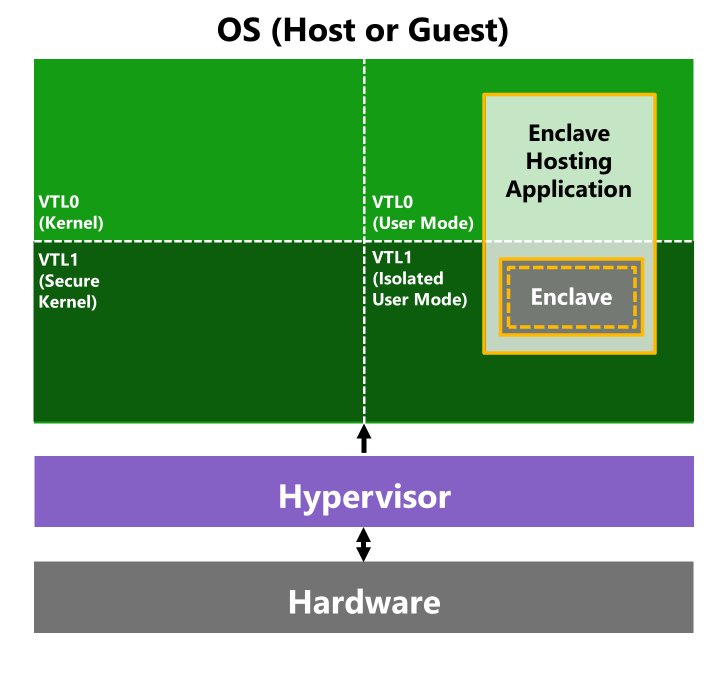
And as stipulated, we must jump through a series of ‘hoops’ in order to allocate and map a DLL into a secure enclave, depicted below:
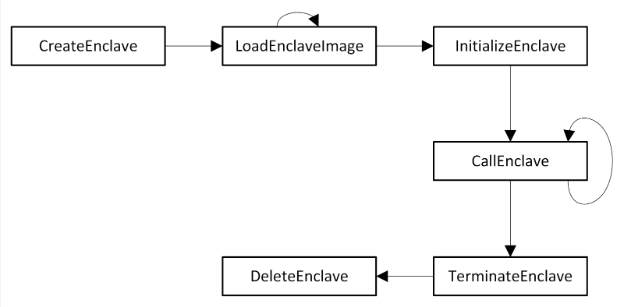
It is this which we wish to build. Microsoft have a knowledge base article on developing a VBS enclave, of which you should read first as a primer as to what is to follow. Their examples are in C, but of course, we are able to use Rust to achieve the same goal.
Finally, Microsoft’s GitHub hosts a vbs-enclave-rs repo which is an implementation of the enclave DLL built in Rust, however that project depends upon a C++ based VTL0 application. We here will build the entire thing in Rust, though I have utilised some of the build pipeline from that project in this, which was very helpful.
The runner
As explained above; we have two components to build. The first is the VTL0 usermode application which I will refer to as the ‘runner’, this is the main application.
As an up-front memo, you may be tempted to do what I did, and search the Windows Rust SDK for the APIs we need to use as outlined by Microsoft, such as CallEnclave.
This gave me a lot of pain and suffering. The sequence of API calls up to this point worked as expected, creating an enclave and
allocating memory, mapping a suitable DLL into the enclave.. fine. Then came CallEnclave. Time and time again I was receiving the
error code 0x56 - ERROR_INVALID_PARAMETER. Every time I get that error in Windows programming it makes me want to throw my
machine out the window. Which parameter!!?
Well, after some debugging and resorting to using C++ - I noticed on my imports table (Rust), CallEnclave was linked against
the wrong DLL. It was only through comparing the import tables of the C++ version and my Rust version that I spotted the difference.
That then led me to this GitHub Issue on the windows-rs project
where another user had the same issue.
The solution, was to not use the windows-rs crate for this particular set of calls and define the FFI (Foreign Function Interface) bindings manually, linking against the correct library.
With that in mind, and the API call order outlined (see above image) we can get started.
FFI Bindings
First lets start out by defining the correct bindings so we can link correctly and call the correct functions. This was simple, as the function prototypes are the same as the vertdll counterparts, so I copied and pasted (aside from instructing the linker) from the windows-rs crate.
We want the functions defined in enclaveapi.h, which are found in the onecore.lib library:
#[link(name = "OneCore")]
unsafe extern "system" {
    fn CallEnclave(
        lpRoutine: *const c_void,
        lpParameter: *mut c_void,
        fWaitForThread: BOOL,
        lpReturnValue: *mut *mut c_void,
    ) -> BOOL;

    fn IsEnclaveTypeSupported(flenclavetype: u32) -> BOOL;

    fn CreateEnclave(
        hprocess: *mut c_void,
        lpaddress: *const c_void,
        dwsize: usize,
        dwinitialcommitment: usize,
        flenclavetype: u32,
        lpenclaveinformation: *const c_void,
        dwinfolength: u32,
        lpenclaveerror: *mut u32,
    ) -> *mut c_void;

    fn LoadEnclaveImageW(lpenclaveaddress: *const c_void, lpimagename: PCWSTR) -> BOOL;

    fn InitializeEnclave(
        hprocess: HANDLE,
        lpaddress: *const c_void,
        lpenclaveinformation: *const c_void,
        dwinfolength: u32,
        lpenclaveerror: *mut u32,
    ) -> BOOL;

    fn TerminateEnclave(lpaddress: *const c_void, fwait: BOOL) -> BOOL;

    fn DeleteEnclave(lpaddress: *const c_void) -> BOOL;
}
We will follow the lifecycle: create the enclave, load an image, initialise, resolve exports, CallEnclave, then
clean the secure memory up.
Coding the runner
Next we need to actually create the enclave and load our DLL into it.
First, we want to check that VBS enclaves are supported:
if IsEnclaveTypeSupported(ENCLAVE_TYPE_VBS) == FALSE {
    // handle error
};
Next we need to set up a lpEnclaveInformation object,
of type ENCLAVE_TYPE_VBS. This is
described as:
Contains architecture-specific information to use to create an enclave when the enclave type is ENCLAVE_TYPE_VBS, which specifies a virtualization-based security (VBS) enclave.
The structure looks as follows:
typedef struct _ENCLAVE_CREATE_INFO_VBS {
  DWORD Flags;
  BYTE  OwnerID[32];
} ENCLAVE_CREATE_INFO_VBS, *PENCLAVE_CREATE_INFO_VBS;
This struct at the time of writing is not exposed to us via bindgen within windows-rs, so we will have to define it ourselves. This is the case of most constants and structs we interface with.
So, by way of an example, let’s reproduce this struct in Rust:
#[repr(C)]
#[derive(Default)]
struct EnclaveCreateInfoVbs {
    flags: u32,
    owner_id: [u8; 32],
}

// We create the object via:
const ENCLAVE_TYPE_VBS: u32 = 0x00000010;
const ENCLAVE_VBS_FLAG_DEBUG: u32 = 0x00000001;

let mut create_info = EnclaveCreateInfoVbs {
    flags: ENCLAVE_VBS_FLAG_DEBUG,
    owner_id: Default::default(),
};

create_info.owner_id[..8]
    .copy_from_slice(&[0x10, 0x20, 0x30, 0x40, 0x41, 0x31, 0x21, 0x11]);
Note that the ENCLAVE_VBS_FLAG_DEBUG must be enabled if you wish to debug the DLL in the secure enclave. You absolutely do not want this enabled in production code!
We then pass this EnclaveCreateInfoVbs structure to the CreateEnclave function:
let p_enclave = CreateEnclave(
    GetCurrentProcess(),
    null_mut(),
    0x10000000, // size of the enclave that we want to create
    0, // not used for VBS
    ENCLAVE_TYPE_VBS,
    &create_info as *const _ as *const c_void,
    size_of_val(&create_info) as u32,
    null_mut(),
);
And this will give us a pointer to the allocated region, which is returned to us in the above p_enclave
variable.
The next major milestone on our journey is to load the DLL into the secure enclave. To do this, we can simply do the below.
Note I have a terminate_enclave function here, which we will get to shortly (performs enclave cleanup).
if LoadEnclaveImageW(p_enclave, w!("vbs_enclave.dll")) == FALSE {
    let gle = GetLastError();
    println!("[-] Failed to load enclave image, error: {gle:#X}");
    terminate_enclave(p_enclave);

    return Err(ProgramError::FailedToLoadImage(gle));
}
Now we must initialise the enclave with a ENCLAVE_INIT_INFO_VBS struct and we can invoke it via: InitializeEnclave.
// Struct definition
#[repr(C)]
#[derive(Default)]
struct EnclaveInitInfoVbs {
    length: u32,
    thread_count: u32,
}

// Code in the main function body
let mut init_info = EnclaveInitInfoVbs::default();
init_info.length = size_of::<EnclaveInitInfoVbs>() as u32;
init_info.thread_count = 1;

if InitializeEnclave(
    GetCurrentProcess(),
    p_enclave,
    &init_info as *const _ as *const _,
    init_info.length,
    null_mut(),
) == FALSE
{
    let gle = GetLastError();
    println!("[-] Failed to initialise enclave image, error: {gle:#X}");
    terminate_enclave(p_enclave);

    return Err(ProgramError::FailedToInitEnclave(gle));
}
At this point the enclave is initialised and we cannot change its state. Lets roll on! The next things we have to do are:
- Find the function address of a function you wish to call that is exported from the DLL in the enclave; and
- Call the function in the enclave
When calling the exported function, you are able to pass a parameter in as input in the lpParameter argument, and you
can receive a pointer as output. To resolve the export address we simply call GetProcAddress.
Note, it was this CallEnclave function which was causing me all the headaches in terms of the windows-rs bindings.
As stipulated in the intro, we are going to pass passwords to the secure DLL and have it tell us whether the password was correct or not. The secure DLL will write to the input structure to tell us whether we were successful or not, this struct looks like:
#[repr(C)]
#[derive(Debug, Default)]
pub struct EnclaveData {
    password: [u8; 20],
    result: bool,
}
So to implement this, where our test function in the DLL (we implement this later in this post) is called CallEnclaveTest:
let Some(proc) = GetProcAddress(p_enclave, s!("CallEnclaveTest")) else {
    let gle = GetLastError();
    println!("[-] GetProcAddress failed: {gle:#X}");
    terminate_enclave(p_enclave);
    return Err(ProgramError::FailedToFindFunction);
};

let mut input = EnclaveData::default();
input.result = false;

let correct_password = "FluxIsAwesome".as_bytes();
let incorrect_password = "Test".as_bytes();
input.password[..correct_password.len()].copy_from_slice(correct_password);

let mut output: *mut c_void = null_mut();

if CallEnclave(
    proc as *const c_void,
    &mut input as *mut _ as *mut c_void,
    TRUE,
    &mut output as *mut _ as *mut *mut _,
) == FALSE
{
    let gle = GetLastError();
    println!("[-] Failed to call function CallEnclaveTest, error: {gle:#X}");
    terminate_enclave(p_enclave);

    return Err(ProgramError::FailedToCallFunction);
};
We can then test that the operation was successful (the logic for checking the password is implemented in the DLL later).
if input.result == true {
    println!("[+] Congrats you guessed the password!");
} else {
    println!("[-] Sorry that password was incorrect!");
}
Tearing down the enclave
Once we are done with the enclave, or we encountered an error, we should deallocate the memory and clean everything up. In the above code I made use of this function which does just that:
fn terminate_enclave(p_enclave: *const c_void) {
    unsafe {
        // fWait: TRUE if TerminateEnclave should not return until all of
        // the threads in the enclave end execution. FALSE if TerminateEnclave should return immediately.
        TerminateEnclave(p_enclave, TRUE);
        DeleteEnclave(p_enclave);
    }
}
And with that; our ‘runner’ application is done. No special build process required for this - it is just an ordinary VTL0 usermode application.
The VTL1 DLL
In this section we will write the DLL which is loaded into the secure enclave. The DLL does not link with the normal
runtimes, instead it links against special enclave versions such as libcmt.lib and libvcruntime.lib. So we need to
make sure we set the process up with those, and also we make sure we use no-std to prevent the Rust standard library
from being brought in, which relies upon subsystems which are not available to us in the VTL1 enclave.
The build script
Okay so, first up, we need to configure a number of compiler flags which are listed in the MSDN article. After some linker disgruntlement, I caved and copied the build script from vbs-enclave-rs, which is as follows:
use std::env;
use std::io::Read;
use std::path::Path;
use std::process::Command;
use std::str;

const PROGRAM_FILES_X86: &str = "ProgramFiles(x86)";
const VCTOOLS_DEFAULT_PATH: &str = "VC\\Auxiliary\\Build\\Microsoft.VCToolsVersion.default.txt";
const MSVC_PATH: &str = "VC\\Tools\\MSVC";
const ENCLAVE_LIB_PATH: &str = "lib\\x64\\enclave";
const UCRT_LIB_PATH: &str = "ucrt_enclave\\x64\\ucrt.lib";

const SDK_SCRIPT: &str = r#"& {
    $kits_root_10 = (Get-ItemProperty -Path "HKLM:\SOFTWARE\Wow6432Node\Microsoft\Windows Kits\Installed Roots\" -Name KitsRoot10).KitsRoot10
    $sdk_version = (Get-ChildItem -Path "HKLM:\SOFTWARE\Wow6432Node\Microsoft\Windows Kits\Installed Roots\" | Sort-Object -Descending)[0] | Split-Path -Leaf
    Write-Host "$($kits_root_10)Lib\$sdk_version"
}
"#;

fn main() -> Result<(), Box<dyn std::error::Error>> {
    println!("cargo::rustc-link-arg=/OPT:REF,ICF");
    println!("cargo::rustc-link-arg=/ENTRY:dllmain");
    println!("cargo::rustc-link-arg=/MERGE:.edata=.rdata");
    println!("cargo::rustc-link-arg=/MERGE:.rustc=.data");
    println!("cargo::rustc-link-arg=/INTEGRITYCHECK");
    println!("cargo::rustc-link-arg=/enclave");
    println!("cargo::rustc-link-arg=/GUARD:MIXED");
    println!("cargo::rustc-link-arg=/include:__enclave_config");

    let program_files_x86 =
        env::var(PROGRAM_FILES_X86).expect("Program Files (x86) path not in environment variables");

    let powershell_output = Command::new("powershell.exe")
        .arg(SDK_SCRIPT)
        .output()?
        .stdout;
    let sdk_path = str::from_utf8(&powershell_output)?.trim();

    println!("{}", sdk_path);

    let vswhere =
        Path::new(&program_files_x86).join("Microsoft Visual Studio\\Installer\\vswhere.exe");

    let vswhere_output = Command::new(vswhere)
        .args([
            "-latest",
            "-products",
            "*",
            "-requires",
            "Microsoft.VisualStudio.Component.VC.Tools.x86.x64",
            "-property",
            "installationPath",
        ])
        .output()?
        .stdout;

    let install_path = Path::new(str::from_utf8(&vswhere_output)?.trim());

    let mut default_path = String::new();
    std::fs::File::open(install_path.join(VCTOOLS_DEFAULT_PATH))
        .expect("Could not open Microsoft.VCToolsVersion.default.txt")
        .read_to_string(&mut default_path)?;

    let msvc = install_path.join(MSVC_PATH).join(default_path.trim());

    let enclave_lib_path = msvc.join(ENCLAVE_LIB_PATH);

    println!(
        "cargo::rustc-link-arg={}",
        Path::new(sdk_path)
            .join(UCRT_LIB_PATH)
            .to_str()
            .expect("Couldn't make string from ucrt.lib path")
    );
    // libvcruntime must come before vertdll or there will be duplicate external errors
    println!(
        "cargo::rustc-link-arg={}",
        enclave_lib_path
            .join("libvcruntime.lib")
            .to_str()
            .expect("Couldn't make string from libvcruntime.lib path")
    );
    println!(
        "cargo::rustc-link-arg={}",
        enclave_lib_path
            .join("libcmt.lib")
            .to_str()
            .expect("Couldn't make string from libcmt.lib path")
    );
    println!("cargo::rustc-link-arg=vertdll.lib");
    println!("cargo::rustc-link-arg=bcrypt.lib");

    Ok(())
}
The above build script is essentially setting up the compiler flags for MSVC, and ensuring all the libraries we need for writing the secure DLL are linkable at compile time.
Cargo toml
As we are writing a DLL, we need to ensure that we have a lib.rs not a main.rs, and that we have the
Cargo.toml set up correctly. The project must be no-std, so in order to comply with these requirements we need
to set up the toml with:
[profile.dev]
panic ="abort"

[profile.release]
panic ="abort"

[lib]
crate-type = ["cdylib"]
lib.rs
Next up, we need to write the core part of the DLL. First, lets setup lib.rs to use nostd:
#![no_std]

#[panic_handler]
fn panic(info: &PanicInfo) -> ! {
    loop {}
}
The docs specify that every DLL loaded into the enclave must have a __enclave_config symbol which is a IMAGE_ENCLAVE_CONFIG64 which specifies the enclave configuration.
If you recall, when we setup the enclave host application above, we set a flag ensuring the memory can be debugged. We need to match this flag in the config symbol.
The struct isnt available, nor are the constants in the windows crate as of now, so here they are, including the code to initialise the __enclave_config symbol (ensure you have the no_mangle attribute so the system can see it):
const IMAGE_ENCLAVE_FLAG_PRIMARY_IMAGE: u32 = 1;
const IMAGE_ENCLAVE_POLICY_DEBUGGABLE: u32 = 1u32;
pub const ENCLAVE_SHORT_ID_LENGTH: usize = 16;
pub const ENCLAVE_LONG_ID_LENGTH: usize = 32;
pub const IMAGE_ENCLAVE_LONG_ID_LENGTH: usize = ENCLAVE_LONG_ID_LENGTH;
pub const IMAGE_ENCLAVE_SHORT_ID_LENGTH: usize = ENCLAVE_SHORT_ID_LENGTH;
pub const IMAGE_ENCLAVE_MINIMUM_CONFIG_SIZE: u32 = offset_of!(ImageEnclaveConfig, enclave_flags) as u32;

#[repr(C)]
pub struct ImageEnclaveConfig {
    pub size: u32,
    pub minimum_required_config_size: u32,
    pub policy_flags: u32,
    pub number_of_imports: u32,
    pub import_list: u32,
    pub import_entry_size: u32,
    pub family_id: [u8; IMAGE_ENCLAVE_SHORT_ID_LENGTH],
    pub image_id: [u8; IMAGE_ENCLAVE_SHORT_ID_LENGTH],
    pub image_version: u32,
    pub security_version: u32,
    pub enclave_size: usize,
    pub number_of_threads: u32,
    pub enclave_flags: u32,
}

#[unsafe(no_mangle)]
pub static __enclave_config: ImageEnclaveConfig = ImageEnclaveConfig {
    size: size_of::<ImageEnclaveConfig>() as u32,
    minimum_required_config_size: IMAGE_ENCLAVE_MINIMUM_CONFIG_SIZE,
    policy_flags: IMAGE_ENCLAVE_POLICY_DEBUGGABLE,
    number_of_imports: 0,
    import_list: 0,
    import_entry_size: 0,
    family_id: [0xFE, 0xFE, 0, 0, 0, 0, 0, 0, 0, 0, 0, 0, 0, 0, 0, 0],
    image_id: [0x01, 0x01, 0, 0, 0, 0, 0, 0, 0, 0, 0, 0, 0, 0, 0, 0],
    image_version: 0,
    security_version: 0,
    enclave_size: 0x1000_0000,
    number_of_threads: 16,
    enclave_flags: IMAGE_ENCLAVE_FLAG_PRIMARY_IMAGE,
};
Sweet! Now we need to define the DllMain function, again, ensure it is wrapped with no_mangle and the capitalisation matches that in the entrypoint specified in build.rs:
#[unsafe(no_mangle)]
pub extern "system" fn DllMain(_i: *const c_void, dw_reason: u32, _res: *const c_void) -> i32 {
    return 1;
}
Finally, we can go ahead and implement our exported function for our DLL.
As explained, our test function is going to check the users input against a password we have stored in our secure memory. For this, we are going to operate mutably on the input buffer to our secure function. As a reminder of the struct we are going to operate on:
#[repr(C)]
#[derive(Debug, Default)]
pub struct EnclaveData {
    password: [u8; 20],
    result: bool,
}
So, we will check the input password against the stored secure password. If it is a match, we will set the result to true, otherwise, we will set it as false.
So, as usual with exported functions we need the no_mangle attribute, as well as defining the function with pub extern “system” fn...
We want to pass in an argument, which we will call ctx, which is a pointer to the user specified EnclaveData. As the password is a slice of bytes, we need to convert this to a str and then compare it against our stored password, which cannot be read from VTL0.
It is only then that we can set the return part of the struct to be true or false. As below:
static STORED_PASSWORD: &'static str = "FluxIsAwesome";

#[unsafe(no_mangle)]
pub extern "system" fn CallEnclaveTest(ctx: *mut EnclaveData) -> *const c_void {
    if ctx.is_null() {
        return null();
    }

    let ctx = unsafe { &mut *ctx };

    let Ok(pw) = CStr::from_bytes_until_nul(&ctx.password) else {
        return null();
    };

    let Ok(pw) = pw.to_str() else {
        return null();
    };

    if pw == STORED_PASSWORD {
        ctx.result = true;
    } else {
        ctx.result = false;
    }

    null()
}
The keen eyed reader may notice that we store the password as a static str - this means an adversary can of course statically read this value from the DLL on the filesystem. This is only a proof of concept as the VTL1 process's memory is protected when not in debug mode.
You could improve on this by setting the return pointer to a particular value to indicate success or specified errors.
Finally, after building, you must run veiid against the built DLL and sign it with a certificate.
# Run as admin
veiid.exe .\target\release\vbs_enclave.dll

# create the cert (and import it to your vm)
New-SelfSignedCertificate -CertStoreLocation Cert:\\CurrentUser\\My -DnsName "MyTestEnclaveCert" -KeyUsage DigitalSignature -KeySpec Signature -KeyLength 2048 -KeyAlgorithm RSA -HashAlgorithm SHA256 -TextExtension "2.5.29.37={text}1.3.6.1.5.5.7.3.3,1.3.6.1.4.1.311.76.57.1.15,1.3.6.1.4.1.311.97.814040577.346743379.4783502.105532346"

# Sign it
signtool sign /ph /fd SHA256 /n "MyTestEnclaveCert" .\target\release\vbs_enclave.dll
Now when we call CallEnclaveTest from the VTL0 application, it will check the password field on the input with the stored password and we can reliably read this from VTL0 as per the below results section!
Result
As you can see, the first attempt the runner attempts the password: “Test”, followed by changing it so the password is “FluxIsAwesome”. When the password FluxIsAwesome is passed in, we get a result that tells us we were successful!
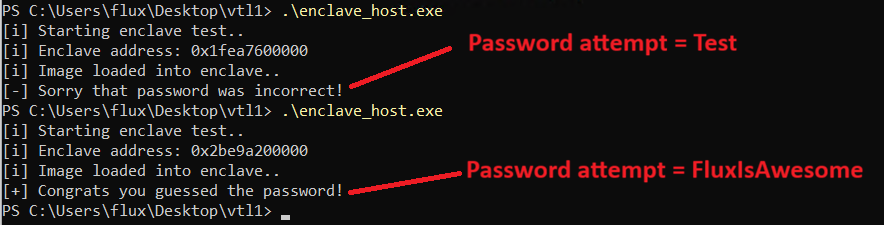
I hope this was helpful! Catch you next time :).
Sources
- https://learn.microsoft.com/en-us/windows/win32/trusted-execution/vbs-enclaves-dev-guide
- https://learn.microsoft.com/en-us/windows-hardware/design/device-experiences/oem-vbs
- https://github.com/microsoft/windows-rs/issues/3710#issue-3311293984
- https://github.com/microsoft/Windows-classic-samples/tree/main/Samples/VbsEnclave
- https://connormcgarr.github.io/hvci/
- https://www.outflank.nl/blog/2025/02/03/secure-enclaves-for-offensive-operations-part-i/
- https://techcommunity.microsoft.com/blog/microsoft-security-blog/everything-old-is-new-again-hardening-the-trust-boundary-of-vbs-enclaves/4386961
- https://learn.microsoft.com/en-us/virtualization/hyper-v-on-windows/tlfs/vsm
- https://github.com/microsoft/vbs-enclave-rs/tree/main/sample